T&M ticket app: signed before you leave the jobsite.
The Benetics AI T&M ticket app turns what you say into a finished ticket: who, how long, on what, and with which material. It fills in the fields, does the math, and the customer signs on your phone before you drive off.


Spoken, not typed
Press the mic and talk. Labor hours, material, and work done land in the right fields.

Templates that do the math
Formula fields multiply hours by the rate, add the material, and carry it all to the total for billing.

Signed on the jobsite
The customer signs on the phone. The T&M ticket is backed up before anyone asks.
500+ companies document by voice with Benetics AI




























500+ companies document by voice with Benetics AI





Fill out T&M tickets by voice, not at the kitchen table at night
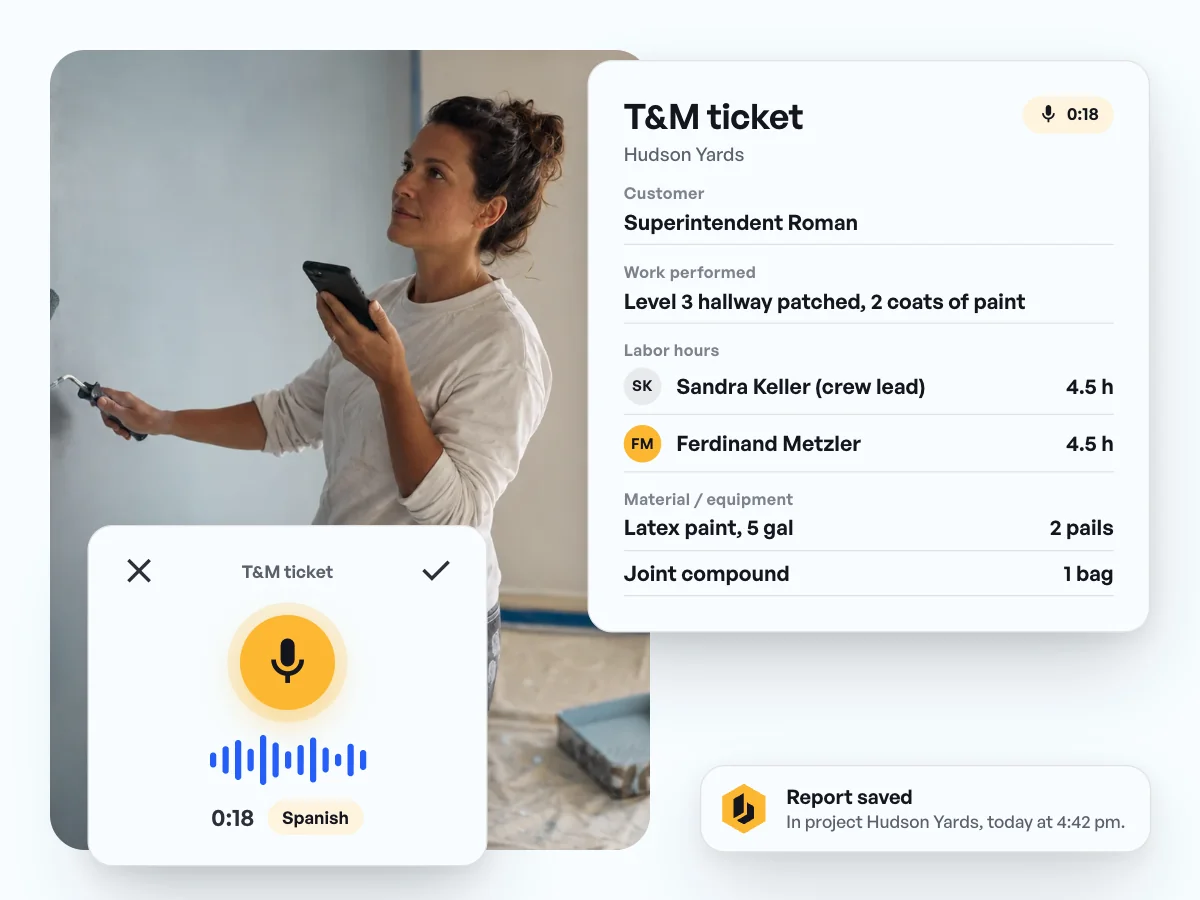
- Talk in plain sentences, in your own accent, even in Spanish.
- Who, how long, on what, with which material: the AI puts it in the right fields of the T&M ticket. If your price list is in the project, Ben enters the material the way it's listed there.
- You look it over, save it, and the ticket is in the project the same day.

T&M ticket template with prices: hours times rate, plus material
- A priced T&M ticket template comes with the app, ready to use.
- Formula fields multiply and add up to subtotals and a total.
- You adjust the fields and hourly rates to the way your company works. Only project admins see the hourly rate, not everyone who fills out the ticket.

Get T&M work signed on the jobsite and billed
- The customer signs the T&M ticket right on the phone, with name and date.
- Hours and material go on to the software your office uses, through Make.com, Zapier, or the REST API.
- Partners get the ticket through a secure link, by email or WhatsApp.
T&M tickets by app: what our customers say.
“Before Benetics, we had lost revenue and change orders that were never applied.”

Steve Ball
Director of Operations, EJH Construction Inc
“It really helps me expedite in the field. [...] The next day the air conditioning guys would come in and put up their ducts but cut our cables in half [...] With Benetics we could do that real time. We could get a change order back to the client to repair the damage and be done.”
Jonathan Gold
Program Manager, J2 IT Group
“Benetics keeps our technicians efficient in the field while creating visibility for our management and engineering teams”
Joe Chambers
Operations Manager, Elite Fire Safety, Novi, Michigan


Common questions about the T&M ticket app.
T&M (time and materials) work is anything outside the contract scope that gets billed by effort: labor hours plus material. The T&M ticket, also called a T&M sheet or extra work ticket, records who worked on what, for how long, and with which material. It's the basis for billing that work.
Open the project, pick the template, and press the mic. Then say who worked on what, for how long, and with which material. The AI fills in the fields, and you look it over and save.
Yes. A priced template comes with the app. Formula fields multiply hours by the hourly rate and quantities by the unit price, then add everything up to subtotals and a total. You can adjust the fields and rates to your company.
Yes, if your catalog, price list, or material list is in the project's documents. When you speak the report, Ben, the AI assistant, looks up the material, product, equipment, or tool you name and fills in the name as listed, plus the item number if your template has a field for it. Quantity and unit come from you. If there's no clear match, what you said stays. It works best with PDFs where you can select the text. Ben can't read scanned pages or older .xls and .doc files.
Only if you want them to. Fields like hourly rate or price can be restricted in the template, including inside tables. Then only the project admins can see and edit them, and everyone else fills in the rest. An export only includes the fields that person is allowed to see. And Ben, the AI assistant, won't fill in a restricted field for someone who isn't allowed to see it.
A change order changes the contract: scope, price, or schedule. A T&M ticket records the hours and material actually spent, often as backup for a change order or for extra work the customer approved on the spot. Signed the same day, it gives you the paper trail when the work gets priced.
Yes. The ticket has a signature field. The customer or the GC's superintendent signs right on the phone, with name and date.
It's in the project right away, where the office can pull it up. Through Make.com, Zapier, or the REST API, hours and material go on to the software your office uses. Partners who don't use Benetics AI get the ticket through a secure link, by email or WhatsApp.